Most app briefs I read start with the same sentence: "I want to build an app, and I have the screens in my head." There are 25 to 40 screens in that head. There is rarely a note on what already exists in the app store, and rarely a stranger who has seen even 1 screen. In many of these cases the right answer is not the app as described.
This post is about how to validate a mobile app idea before building it. Not with a survey and not with a landing page that promises an app, but with 4 checks that take 2 weeks: app store research, a competitor teardown, a 1 screen prototype test, and a platform decision. At the end you know whether to build, what to build first, and whether it should be a native app at all.
I run this as the mobile version of our product discovery for startups sprint. The structure is the same. The checks are different, because an app lives in a store, on a small screen, and competes with 30 apps that already do something close.
What validating a mobile app idea means
Validation does not mean proving the idea is good. It means removing the 4 reasons most apps fail before anyone writes code. Nobody has the problem. Somebody already solved it. The core action takes too many taps to become a habit. Or the idea is right but the platform is wrong.
Each check targets 1 of those reasons. App store research answers whether the problem exists at scale. The competitor teardown answers whether it is already solved. The 1 screen prototype test answers whether the core action works on a phone. The platform decision answers whether to build native, cross platform, or web first.
The output is a short document, 1 clickable screen, and a build recommendation. If we end with 40 screens, we skipped the validation and went to design.
Days 1 to 2: app store research
I start in the store, not in Figma. I search the App Store and Google Play with the 10 phrases a user would type, not the name of the idea. For a sleep tracking idea that is "sleep", "sleep tracker", "snore", "wake up", "bedtime", and so on. I record the top 10 results per phrase, their rating count, and their last update date.
Rating counts are the useful number. An app with 40,000 ratings and a 4.7 score tells me the problem is real and the bar is high. 30 apps with under 200 ratings each tells me the problem is small or people do not search for it. 0 results tells me either the idea is new or nobody wants it, and the second is more common.
Then I read the 1 star and 2 star reviews of the top 5 apps. I sort them into 4 buckets: missing feature, too many steps, paywall, and bugs. The too many steps bucket is where a new app can win. The missing feature bucket is usually a feature the incumbent will ship next quarter.
Days 3 to 4: competitor teardown
A competitor teardown is not a feature comparison table. It is a recording of the first 5 minutes in each of the 5 top apps, from install to the first moment of value. I screen record every tap and count them. I note every permission prompt, every signup wall, and every empty state.
The numbers are the finding. If the top app takes 14 taps and 2 permissions before the core action, and our prototype can do it in 4, that is the product. If the top app does it in 3 taps and has 40,000 ratings, our idea needs a different core action.
I also write down what each app does not do. Not features, but jobs. A meditation app with 500 sessions still does not help someone who has 90 seconds in a car park. That gap is where 1 screen can beat 500.
Days 5 to 8: the 1 screen prototype test
This is the check that matters. I design 1 screen, sometimes 2, in greyscale in a phone frame, and make it clickable in Figma. It is the screen where the core action happens. Not onboarding, not the paywall, not the settings. The 1 screen a user would open 5 times a day if the app worked.
Then I put it in front of 5 people who have the problem, on their own phone, for 15 minutes each. I give them the situation, not the task: "it is 11pm, you cannot sleep, you open this." I watch where the thumb goes first, where it stops, and what they say in the first 10 seconds. The usability test is short because the app will be used in short moments.
After 5 tests I count 3 things. How many completed the core action without help. How many said what the app does in 1 sentence, unprompted. How many asked if they could keep it. 4 of 5, 4 of 5, and 2 of 5 is a build. 2 of 5, 1 of 5, and 0 of 5 is a stop, or a different screen.
Days 9 to 10: native, cross platform, or web first
The platform decision comes last, because it depends on what the tests showed. Founders usually arrive with native in mind. We recommend web first more often than founders expect, and native first less often than they hope.
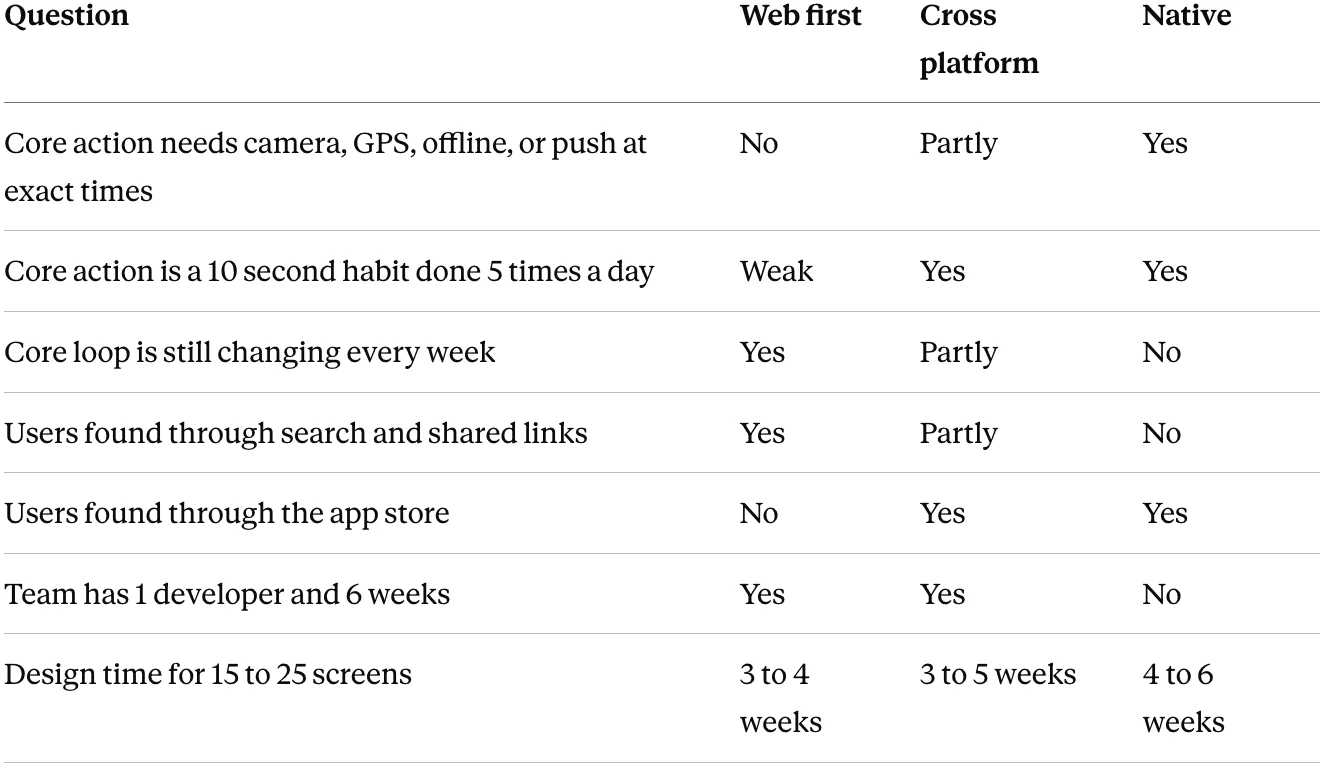
Web first means a responsive web app, installable to the home screen, no store review, changes shipped daily. It is right when the core loop is not settled and users arrive from links. Cross platform is right when the app needs store presence and 1 codebase is enough. Native is right when the core action needs the hardware or the 10 second habit.
The recommendation names the platform and the reason in 3 sentences. If the reason is "it feels more real as a native app", it is not a reason.
A first pass you can do yourself in 1 evening
Before you brief a mobile app design studio, do this. It takes 3 hours and a phone.
- Search the store with 10 phrases a user would type. Write the top 5 results per phrase with rating counts.
- Install the top 3. Screen record from install to the core action. Count the taps.
- Read 30 low star reviews of the top app. Sort into missing feature, too many steps, paywall, bugs.
- Write the core action of your app in 1 sentence starting with a verb, and the situation in which it happens.
- Sketch that 1 screen on paper, phone sized.
- Show the sketch to 3 people who have the problem, in the situation if possible. Ask what it does. Count who gets it.
If step 1 shows 0 apps with over 1,000 ratings, ask why before you continue. If step 6 returns 0 of 3, the screen is wrong or the problem is.
When to not build the app
The problem is real but the moment is not mobile. Users described doing the job at a desk, on a Sunday, for 40 minutes. That is a web product, not an app.
The top app does the core action in 3 taps and has 50,000 ratings. Users complain about the paywall, not the steps. A new app with the same core action will not move them.
The core action needs 6 screens and cannot be shortened. It will not become a habit, and an app without a habit is uninstalled in 7 days.
Or the founder cannot find 5 people to test with. Then the store will not find them either.
When we say stop, we offer 2 alternatives in writing. A web first version of the same core action that can launch in 4 weeks and test demand without a store listing. Or a different core action that came up in the tests, usually from the 1 sentence users said when asked what the app does.
Mistakes I see in mobile app validation
Validating with a landing page. A waitlist tells you people liked a headline. It does not tell you the core action works on a phone or that it becomes a habit.
Testing on a laptop. Thumb reach, keyboard, interruptions, and 1 handed use are the mobile problems. A Figma or Claude prototype on a 27 inch screen hides all 4.
Prototyping onboarding first. Onboarding is 3 screens the user sees once. The core screen is the 1 they see 500 times. Test that.
Comparing features instead of taps. A competitor with 60 features and 14 taps to the core action is weaker than it looks.
Choosing native because the founder uses native apps. The platform follows the core action and the team, not the founder's phone.
Where AI tools help and where they do not
AI tools help with the reading. Summarising 300 store reviews into the 4 buckets takes 10 minutes. Listing the permissions and signup walls of 10 apps from screen recordings is fast. Generating 5 variants of the 1 screen for the test is fast.
They do not help with the test. The AI did not watch the thumb stop at the bottom of the screen for 3 seconds. It cannot tell that 4 of 5 users said the same wrong sentence about what the app does. And it will recommend native, cross platform, or web with equal confidence. The platform call and the stop stay with a designer who watched the 5 tests.
FAQ
How do I validate a mobile app idea before building it?
Search the store with the phrases users type and count ratings, tear down the top 5 apps by taps to the core action, then design 1 screen and test it with 5 people on their own phones. If 4 of 5 complete the core action and 2 of 5 ask to keep it, build. If not, change the screen or stop.
How long does mobile app idea validation take?
10 working days. 2 days of app store research, 2 days of competitor teardown, 4 days to design and test the 1 screen prototype, and 2 days for the platform decision and the recommendation. Longer than that usually means the core action is not clear.
Should my first version be a native app or a web app?
Web first if the core loop is still changing and users arrive from links or search. Native if the core action needs the camera, GPS, offline use, or timed push, or is a 10 second habit done many times a day. Cross platform sits in between when store presence matters and 1 codebase is enough.
How many users do I need to test a mobile app prototype?
5 people who have the problem, on their own phones, for 15 minutes each. After 3 the pattern is visible, after 5 it is stable. Friends and colleagues do not count unless they have the problem.
What is a 1 screen prototype test?
It is a usability test on the single screen where the core action of the app happens, in greyscale, clickable in Figma, shown in the situation the app would be used. It skips onboarding, paywalls, and settings on purpose, because those screens are seen once and the core screen is seen 500 times.
What does a competitor teardown for an app include?
A screen recording of the first 5 minutes in each of the top 5 apps, from install to the first moment of value, with the tap count, the permission prompts, the signup walls, and the empty states written down. Plus a list of the jobs those apps do not do.
Working with us
We validate mobile app ideas in a 2 week sprint: app store research and a competitor teardown in week 1, a 1 screen prototype tested with 5 users and a platform recommendation in week 2. If the recommendation is build, MVP design for iOS and Android follows in 3 to 6 weeks, with the first screens in 5 business days. We work in Figma, Claude, Slack, and Loom, async across timezones.
We also say when you do not need us. If your app already exists and the question is why day 7 retention is low, you need a UX audit, not validation. If you have already tested 1 screen with 5 strangers and 4 completed the core action, skip validation and go to MVP design. And if you cannot find 5 people who have the problem, we will say so on the intro call.
If you have an app idea and a list of screens in your head, send us the core action in 1 sentence. Book a free 15 minute intro call